Introduction
Most professionals didn’t realize how much time they were wasting on photo editing until AI started doing it faster. Whether you’re running a marketing team, managing product catalogs, or building a personal brand on LinkedIn, visual content has quietly become one of the most resource-intensive parts of modern business operations.
According to a 2025 Adobe usage report, creative teams spend an average of 6–8 hours per week on repetitive image adjustments color correction, background removal, noise reduction tasks that are now being automated with surprising accuracy. Meanwhile, AI image editing adoption among SMBs grew by over 40% between 2024 and 2026, largely driven by tools that no longer require design training to use well.
The three platforms dominating this conversation right now are Adobe Lightroom (with its AI-enhanced suite), Skylum’s Luminar Neo, and Adobe Photoshop’s increasingly capable Generative AI features. Each solves a different problem, and each has a different ideal user.
If your team creates content at any real volume or if you’re still outsourcing basic edits this comparison is worth a careful read before your next budget cycle.
Our Lates Blog : How AI Reasoning Models Work: O3, Gemini Thinking, and the Future of Deep Thinking AI
What Exactly Is AI Photo Editing?
Before jumping into the comparison, it’s worth being clear about what “AI editing” actually means in this context because the term gets stretched in different directions by different vendors.
At its core, AI photo editing refers to tools that analyze image content and make intelligent, context-aware adjustments automatically. This goes beyond simple filters or presets. The AI understands what’s in the photo sky, skin, fabric, background and edits each element based on that understanding.
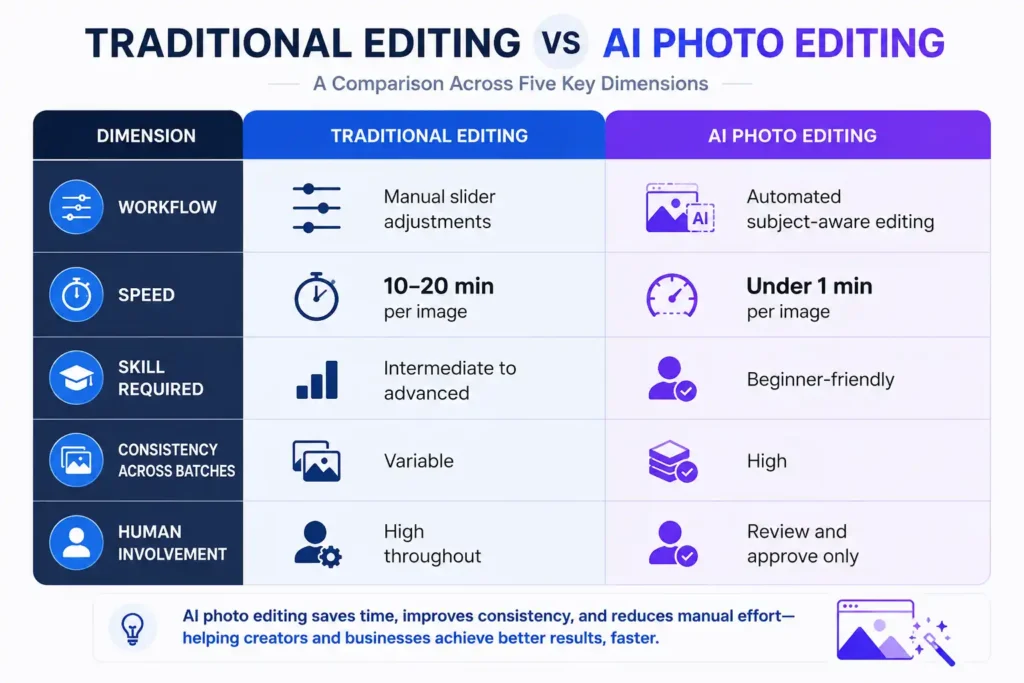
Think of it this way: a traditional editor adjusts sliders and masks manually. An AI editor looks at a portrait and says, “That’s a face, that’s a background, here’s what needs doing” and does it without you selecting anything.
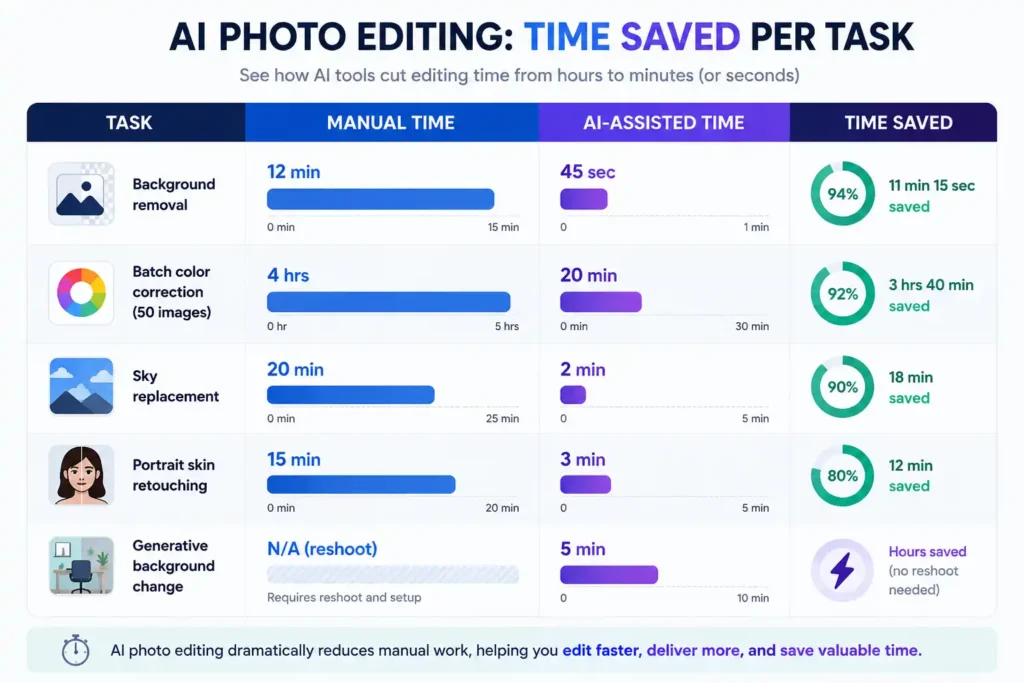
The practical result: edits that used to take 15 minutes can happen in under 30 seconds.
Why Businesses Are Moving Beyond Manual Editing
The shift isn’t really about technology preference. It’s about throughput.
A startup running paid campaigns across five channels might need 40–60 edited images per week. A real estate firm processing property photos needs even more. Doing that manually either slows the team down or pushes up outsourcing costs.
AI tools have changed the math in a few specific ways:
- Speed: Batch edits that used to take hours now run in minutes
- Consistency: AI applies the same treatment across hundreds of photos with no variance in fatigue or judgment
- Accessibility: Non-designers can now handle editing workflows that previously required Photoshop expertise
- Cost control: Reducing dependency on external retouchers translates directly to operational savings
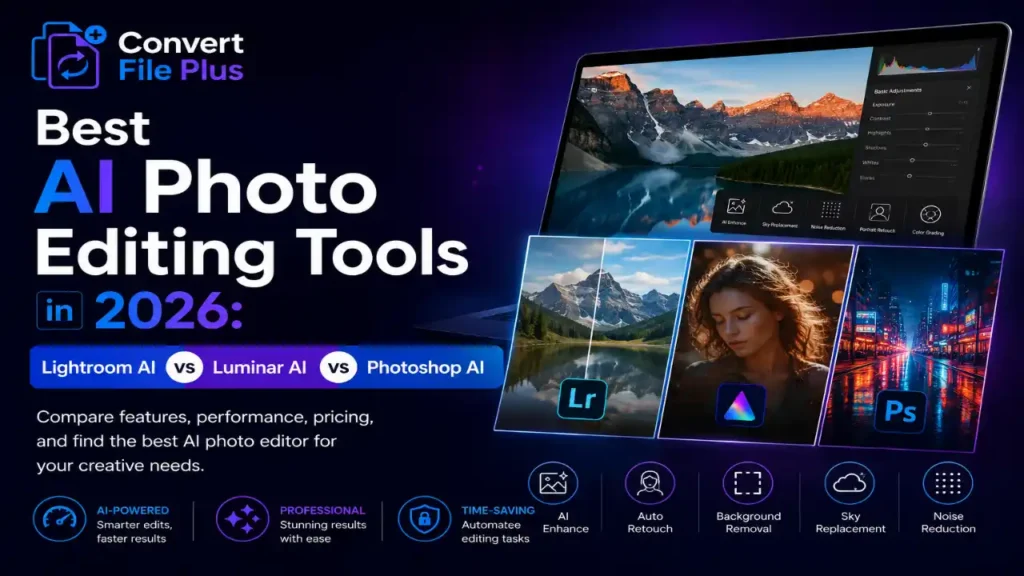
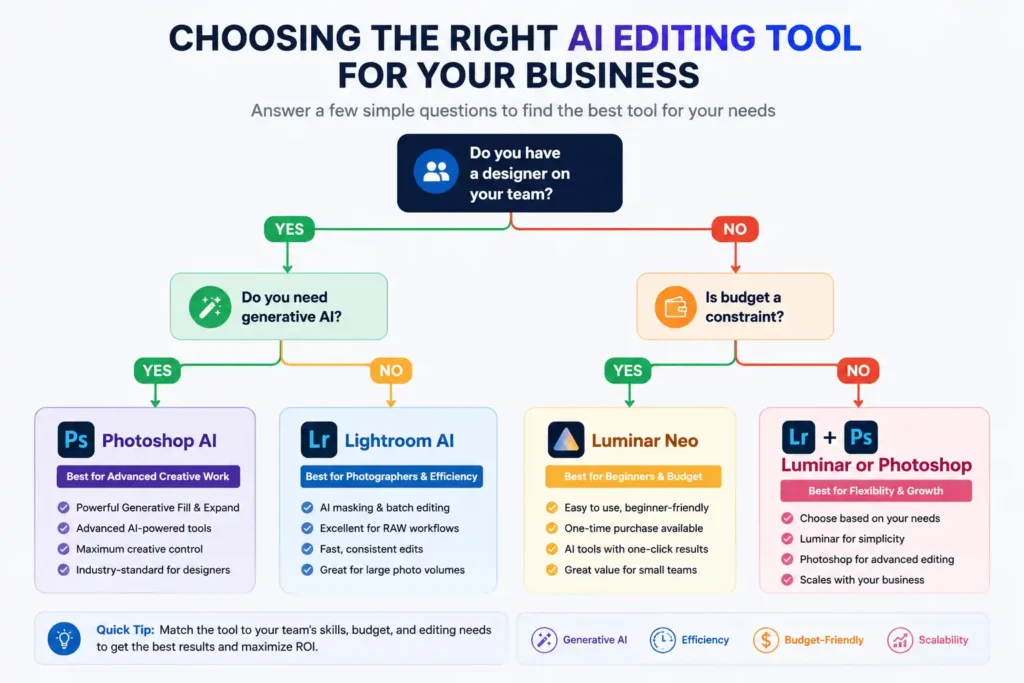
The three tools below each address this shift differently. Lightroom focuses on workflow efficiency for photographers. Luminar prioritizes accessibility for non-technical users. Photoshop leans into creative control and generative capability.
The Three Tools: What Each One Actually Does Well
Adobe Lightroom AI
Lightroom has been the industry standard for photo management and editing for years. The AI layer added in recent versions doesn’t try to reinvent the tool it enhances what experienced photographers already rely on.
What works well:
- AI Masking is genuinely impressive. It detects subject, sky, background, and even specific objects like clothing or hair, letting you edit them independently without drawing a single mask.
- Denoise AI recovers detail from high-ISO shots with results that match or exceed what dedicated noise-reduction software used to offer.
- Auto Settings have improved significantly. They’re no longer embarrassing starting points in many cases, they’re close to final.
The honest limitation: Lightroom AI is built for photographers who already understand editing. The interface assumes familiarity. If your team doesn’t have that background, the learning curve is real.
Best for: Photography teams, marketing agencies, anyone managing large volumes of RAW files who wants precision tools with AI assistance layered in.
Luminar Neo (Skylum)
Luminar’s pitch has always been accessibility, and the AI features in the 2026 version double down on that. It’s designed for people who want good results without investing weeks in learning the craft.
What works well:
- Relight AI lets you change the direction and quality of light in a photo after the fact. For product photography and portraits, this is genuinely useful.
- Portrait Bokeh AI simulates shallow depth of field convincingly useful for smartphone photos that look flat.
- Sky AI can replace skies realistically, adjusting lighting on the foreground to match the new sky. It’s more polished than Lightroom’s sky replacement tool.
- Background Removal is fast and works well on complex edges like hair, which has historically been difficult.
The honest limitation: Luminar leans heavily on presets and one-click solutions. Experienced editors may find it frustrating when they want fine-grained control that simply isn’t accessible. It’s also a standalone app it doesn’t integrate into a broader asset management workflow the way Lightroom does.
Best for: Small business owners, content creators, social media managers, and teams without dedicated designers who need good visual output without a steep learning curve.
Adobe Photoshop Generative AI
Photoshop’s Generative Fill and Expand features, powered by Adobe Firefly, have matured significantly since their initial rollout. This is where the tool genuinely earns attention in 2026.
What works well:
- Generative Fill lets you select any area of an image and describe what you want added, removed, or replaced. Remove a person from a background. Extend a product shot. Add a different surface. The quality, while not always perfect, is production-ready more often than not.
- Generative Expand adds context around an image useful when a photo is too tightly cropped for a particular layout.
- Object Selection and Removal has become significantly better with AI. Removing background elements and having Photoshop fill them in plausibly used to require significant manual work. Now it’s often a two-click operation.
The honest limitation: Photoshop remains the most complex of the three tools. The generative AI features are powerful, but you still need foundational Photoshop knowledge to use them efficiently. The tool also requires a Creative Cloud subscription, which isn’t cheap for smaller teams.
Best for: Design professionals, marketing directors managing brand visual standards, and teams that need creative manipulation beyond simple enhancement.
The Real Business Case: Where Each Tool Saves You Money
Different tools justify themselves differently, and it’s worth thinking about this before committing to a subscription.
Lightroom AI saves time on volume. If you’re processing 500 product photos a month, the AI masking and batch editing features alone can cut editing time in half. For photography-heavy businesses, the ROI calculation is usually straightforward.
Luminar Neo saves money on talent. If your alternative is hiring a retoucher or paying a freelancer for basic work, Luminar’s one-click tools can cover a surprising amount of that ground. The per-seat cost is low relative to outsourcing.
Photoshop AI saves money on production. The generative features reduce the need for reshoots. If you need a product on a white background, then on a lifestyle background, then cropped differently for a banner that used to mean three separate shot setups. Now it’s often one shoot and some prompting.
What Businesses Should Consider Before Choosing
It’s tempting to pick the tool with the most impressive demo reel. But a few practical questions matter more:
- Who will actually use it? If it’s non-designers, complexity kills adoption. Luminar wins that scenario.
- What’s your file type? RAW shooters need Lightroom’s ecosystem. JPEG-heavy workflows are more flexible.
- Do you need generative capabilities? Only Photoshop offers that level of creative manipulation.
- What’s the budget structure? Luminar offers one-time purchase options; Adobe tools are subscription-based.
- How does it fit your existing stack? If you’re already in the Adobe ecosystem, Lightroom and Photoshop integrate cleanly. Luminar is more standalone.
Challenges Worth Acknowledging
No tool is frictionless, and these three have real limitations worth naming.
AI editing can produce artifacts strange blurs, unnatural skin textures, misidentified objects especially with complex images. Generative AI outputs are inconsistent; the same prompt can yield very different results. Licensing for AI-generated content is still evolving, which matters if you’re in a regulated industry or using content commercially.
There’s also the question of over-reliance. Teams that lean entirely on AI editing can lose the visual judgment needed to catch when something looks wrong. Keeping at least one person with editing literacy in the review loop is still a good idea.
Conclusion
The conversation around AI photo editing has moved past novelty. These tools are now embedded in how visual content gets produced at scale and the gap between teams using them well and teams ignoring them is becoming visible in output quality and operational cost.
Lightroom AI, Luminar Neo, and Photoshop AI aren’t competing for the same user. They solve different problems at different price points for different skill levels. The best choice depends less on which has the most features and more on which fits how your team actually works.
What’s worth paying attention to is the trajectory. Each of these tools has improved significantly in the past 18 months, and the pace isn’t slowing. Capabilities that felt experimental in 2024 are now production-ready. That trend will continue.
The businesses that build internal familiarity with these tools now even imperfectly will be better positioned than those waiting for everything to stabilize. It won’t stabilize. That’s the nature of this particular shift. The smarter move is to start learning while the stakes are low.
What AI editing tools is your team using in 2026? Curious what’s actually working for others drop it in the comments.

- Difference Between Image Resolution and Image Size: Complete Guide (2026) - July 13, 2026
- How Much Does AI Software Cost for Startups in 2026? - July 7, 2026
- How to Use AI to Write Blog Posts Faster Without Losing Your Voice - June 28, 2026